
Play Pocket Skyline
One power plant, an empty field and $9,000.


Free on iPhone in the Roam app. Android coming soon.
 Play free now
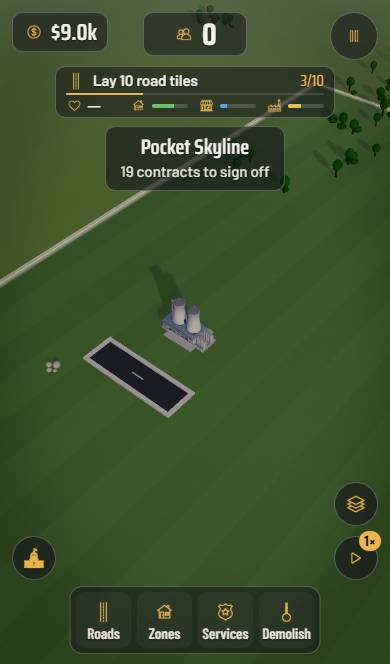
Pocket Skyline starts you on a green field with one power plant, a few trees and $9,000. Draw a street out from the plant, zone the land beside it and watch the first buildings move in. It is one of the games like SimCity that you can play on iPhone, free in the Roam app, and it gives you a clear list of 19 contracts to work through. The first one is simple: lay 10 road tiles.
How to build your first town
- Open the Roads tab and draw a street from the power plant.
- Use Zones to mark land along the road so buildings can appear.
- Add Services as the city grows, and use Demolish to fix mistakes.
- Follow the contracts. Each one sets a goal, like laying 10 road tiles.
- Switch the speed and the layers view to see how the city is doing.
What a city builder needs, in pocket size
- Classic tools: roads, zones, services and a bulldozer.
- A contract list that tells you what to build next.
- Money and population on screen, with four meters for the city.
- Speed control for when you just want to watch it grow.
How it compares to games like SimCity
SimCity set the rules every city builder still uses: lay roads, zone land, connect power and services, and let the city fill in. Pocket Skyline follows those rules on a phone-sized map. The tabs are the same ideas, Roads, Zones, Services and Demolish, so if you have played SimCity or SimCity BuildIt you already know the tools.
The difference is direction. Instead of an open sandbox from minute one, Pocket Skyline hands you contracts to sign off, which tells you what to do next and makes the early game easier to learn.
Tips for a city that grows
Start every road at the power plant so new zones are connected. Build in short, tidy streets instead of long empty ones, because money goes fast at the start.
Read each contract before you spend. They point you at the next thing the city needs, and finishing them is the fastest way through the list.
More free games like Pocket Skyline

Pocket Skyline FAQ
Is Pocket Skyline a free city builder?
Yes. Building costs in-game dollars only. The game and the Roam app are both free on iPhone.
Are there free games like SimCity on iPhone?
Pocket Skyline is one. It has roads, zoning, services and a contract list, and it plays in the Roam app at no cost.
What do the contracts do in Pocket Skyline?
They are your goals. There are 19 to sign off, starting with laying 10 road tiles, and each one teaches the next part of building a city.
explore worlds
Play Pocket Skyline free in the Roam app.