
AI game maker apps: what to check, and how the flow works
A good AI game maker app hands you a game you can play on your phone, not a sprite, a demo or a code file. Check six things before you download one. Roam, our app, is the example below: you describe a game or use a photo, AI builds it, and you change it by talking.
Checked . Roam is our app, and the Roam team wrote this page. See also: AI game maker, AI game maker apps, Astrocade alternative, Best Astrocade games.
Six things to check before you download
- It returns a game. World, art, characters, sound and rules arrive together. Some tools return only art, a demo or code.
- It runs on your phone. Check the store first. Roam is on the App Store for iPhone, and the listing also lists iPad. On Android you can pre-register for Roam on Google Play.
- The paid part is clear. Read the in-app purchases. Many apps are free to download and sell plans, coins or prompt packs.
- You edit by talking. "More enemies." "Make it two-player." A good app rebuilds from a plain request instead of making you start over.
- Friends can play. A share link is the minimum. In Roam, friends can be inside the game as the characters, the rivals or the monster.
- You know who owns it. Terms differ a lot. Roam's terms say you keep ownership of what you make. Nanogram's and Upit's terms give AI-made games to the company.
How the app flow works, step by step
- 1. Open the app. Install Roam from the App Store and play a few games in the feed first.
- 2. Describe the game. Name the genre, the place, the goal and how you lose. Or start from a photo: your friend, your dog, a meme screenshot.
- 3. Play the first build. It comes back playable. Treat it as a draft and find the one thing that feels off.
- 4. Change it in the same chat. Ask for one change at a time, like "slower at the start", and play again after each one.
- 5. Play it with friends. Play solo first, then send it and play together when they are on.
AI game maker apps you will find in the stores
These come up when you search the App Store or Google Play. For a bigger table with free tiers, friends and ownership, see our AI game maker apps compared.
- Roam. Describe a game or use a photo, play it, change it by talking, and play solo or with friends. iPhone and iPad on the App Store; Android is pre-register.
- Astrocade. A feed of short AI-made games that you can also make, on the web, iPhone and Android. Its terms keep AI-made parts as Astrocade Content.
- Pocket by Meta. A free app that turns a prompt into a small "gizmo" that reacts to touch and tilt, posted to a feed where others can remix it. It reached the US in August 2026 on iOS and Android.
- Gummy. Turns a text idea, with an optional image, into a 2D or 3D game you refine by chat. iPhone and iPad, free to download, with weekly and monthly plans and prompt packs.
- GDevelop. Not prompt-only: a no-code engine with iPhone and Android apps and an AI helper. Its free plan has 40 AI credits a month.
Play it on Roam

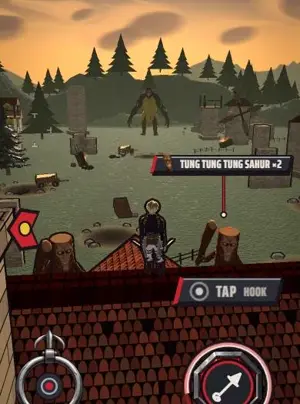
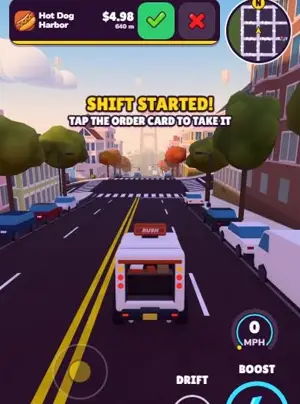
Try the flow in the Roam app
Type one sentence, play what comes back, then change it by talking.
Try: "zombie mall at closing time, one flashlight, my friends are the other survivors, 3 lives"Roam ("Roam - Make Games" on the App Store) is an iPhone app where you play games and make your own by describing them or from a photo. It is free to download and play, and making games works without a subscription; optional Spark and Reality plans and credit packs add more creation. Android: pre-register on Google Play.
Questions people ask
Is there a free AI game maker app?
Most are free to download and charge for more creation. Roam is free to download and play, and making games works without a subscription. Optional Spark and Reality plans and credit packs add more creation.
Is there an AI game maker app for Android?
Yes. Astrocade, Pocket and GDevelop are on Google Play. Roam is on the App Store for iPhone (the listing also lists iPad), and Android users can pre-register on Google Play.
Is there an AI game maker app for iPhone?
Yes. Roam, Astrocade, Pocket, Gummy and GDevelop all have iPhone apps. Rosebud runs as a web editor and lists no phone app.
Sources, checked November 5, 2026
- Roam on the App Store (iPhone and iPad): apps.apple.com
- Roam terms: you retain ownership of content you create: roam.gg
- Astrocade on the App Store: apps.apple.com
- Astrocade on Google Play: play.google.com
- Astrocade terms: AI-made parts stay Astrocade Content: astrocade.com
- Meta's Pocket reached the US on Aug 20, 2026, free, gizmos respond to touch and tilt, feed and remix: engadget.com
- Gummy on the App Store: text and image to 2D and 3D games, iPhone and iPad, weekly and monthly plans and prompt packs: apps.apple.com
- GDevelop platforms, including iOS and Android: gdevelop.io
- GDevelop free plan: 40 AI credits a month: gdevelop.io
- Nanogram terms: rights in AI-made games go to Nanogram: nanogram.app
- Upit terms: FRVR owns games generated with its AI: upit.com
- Rosebud AI: web editor, free plan of 10,000 credits a week: rosebud.ai
Product names belong to their owners. Roam is not affiliated with them.
Keep exploring
- The best AI game maker
- How to make a game on iPhone
- Game maker apps
- How to make a game with AI
- The best app to make games
- How to make a game on your phone
- How to make a game with Claude
More on Roam: All Roam games Games to play, by kind