
Play Paint It Back
The town forgot its colors. You have a brush.


Free on iPhone in the Roam app. Android coming soon.
 Play free now
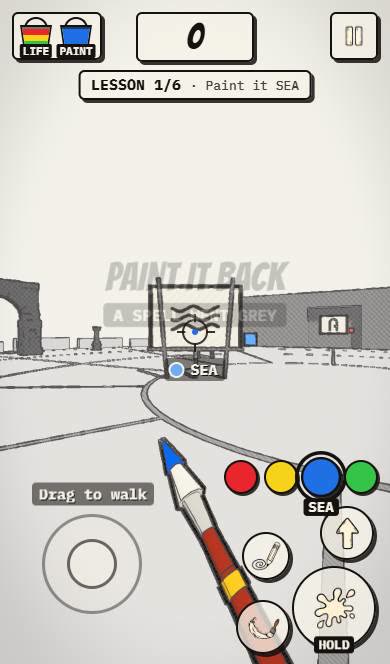
The town around you is drawn in grey ink, and your first lesson is simple: paint it SEA. Paint It Back is a paint the world game you play in first person in the Roam app on iPhone. Pick a color swatch, walk up to a canvas and splash it until the meter climbs from 0% to full. Red, yellow, blue and green sit on the right side of the screen, next to a pencil, a jump and a brush swipe.
Brush and swatches
- Drag to walk through the sketch town.
- Pick one of 4 color swatches: red, yellow, blue or green.
- Hold splash to throw paint, or swipe the brush across a canvas.
- Fill each canvas with the right color to finish the lesson. There are 6 lessons.
What makes it charming
- A hand-drawn ink style town with arches
- Canvases that fill with color as you paint
- Lessons with clear targets, like SEA
- Paint buckets that work as your lives
A paint the world game in first person
Most coloring games are flat pictures you tap. Paint It Back puts you inside the picture. The world is a pencil sketch, and every canvas you finish adds color back to it.
It is a calm puzzle more than a shooter. The question on each canvas is which color, not how fast. Each lesson asks for a specific color, so you learn the palette as you go.
Tips for lesson one
Read the canvas label first. SEA means blue, and the percentage tells you how much is left to cover.
There are a lot of buttons on the first screen. Ignore most of them at the start: walk, pick a swatch, hold splash. Learn the pencil and the jump later, once the first canvas is done.
For calm, creative players
Players who like calm, creative games and a bit of exploring. It is about choosing colors and filling canvases, not about speed.
It is also nice for anyone who likes art styles that stand out. The ink-drawn town looks like a sketchbook come to life, and each painted canvas changes how it looks.
More free games like Paint It Back
Paint It Back FAQ
Is Paint It Back free to play?
Yes, it is free. You play it in the Roam app, which is itself a free iPhone app.
What do you do in Paint It Back?
You walk a grey sketch world in first person and splash the right colors onto canvases to bring color back, one lesson at a time.
Is there a paint the world game on iPhone?
Paint It Back is one. You pick colors, splash canvases and watch the meter fill across 6 lessons.
How many lessons are in Paint It Back?
Six. The first one is Paint it SEA.
explore worlds
Play Paint It Back free in the Roam app.