


How to make a game in Rosebud AI, step by step
You make a Rosebud AI game on rosebud.ai: sign in, type a prompt, press Create, then fix it by chatting with its AI, Rosie, and press Publish to get a link.


Quick answer
Open rosebud.ai on a computer and sign in. Describe the game, select Create and answer the follow-up questions. Test it in Preview, then ask Rosie for one change at a time. Select Publish, then Share to copy the link. As of November 2026, the free plan gives 10,000 credits a week. To make a game on an iPhone instead, Roam turns a sentence or a photo into a playable game.
Updated . Roam is our app, and the Roam team wrote this page. Roam is free to download and play on iPhone, and making works without a subscription; optional Spark and Reality plans and credit packs add more creation. Android: pre-register on Google Play.
What you need before you start
Rosebud AI is a web game maker, not an app you install. You need an account to create, and its tutorial says to use a desktop or laptop, because the test games use the keyboard.
Each prompt and edit spends credits. The free plan gives 10,000 credits a week in eligible regions, with no card. An edit with Rosie costs about 2,000, and a premium model turn about 20,000.
Make a game in Rosebud AI: the steps
These steps follow Rosebud's own tutorial, checked November 4, 2026.
- 1. Sign in and write a prompt. Say what the player does, how they control it and what ends the game. Select Create.
- 2. Answer the follow-up questions. The tutorial suggests 3D, desktop and single-player for a first game. Let the first version finish.
- 3. Play it in Preview. Click inside Preview, then check the controls, the score and the restart button.
- 4. Ask Rosie for one change. Describe the result you want, wait, and play again. For a bug, say what you did, what happened and what you expected.
- 5. Go back if a change breaks it. Open History to preview earlier versions.
- 6. Publish and share. Select Publish in the toolbar, check the URL and publish. Select Share to copy the link. After edits, select Publish update.
Rosebud AI and Roam: what each path needs
| Rosebud AI | Roam | |
|---|---|---|
| Where you make it | The web editor at rosebud.ai. Its tutorial asks for a desktop or laptop | The Roam app on iPhone (Android: pre-register on Google Play) |
| How you change it | Chat with Rosie. A Code tab shows the code | Talk to it: "more enemies", "make it two-player". No code |
| Free to start | Yes. 10,000 credits a week; an edit with Rosie costs about 2,000 | Free to download and play; making works without a subscription. Optional Spark and Reality plans and credit packs add more creation |
| Who owns the game | Terms say Rosebud owns content made from prompts. Free is non-commercial; selling needs 10x Dev or higher | You keep ownership. Roam gets a license to run, improve and showcase it; you can opt out of AI improvement |
| Age rating | Story Games app: 13+ (App Store). Terms: not for under 13, except school use with parental consent | 13+ (App Store) |
Rosebud facts come from its tutorial, pricing page and Terms of Service (last revised August 2, 2025). Roam does not publish its free limits.
Start from a template or add multiplayer
You do not have to start blank. The home page has a Start from a Template row, and you can remix any published game. Genres include visual novels, RPGs, horror and racing, in 2D or 3D.
For multiplayer, Rosebud's guide (February 10, 2026) says to remix its 3D Multiplayer Template, which gives your copy its own backend, then ask Rosie for features.
Credits, ownership and selling your game
Paid plans run from $15 to $100 a month, and none is unlimited. Commercial rights start at 10x Dev ($30). Code download and a Windows build for Steam start at Pro ($50).
Rosebud's terms say Rosebud owns content made from a prompt. Free-plan games are for personal, non-commercial use. The terms let paid users sell what they make, and the pricing page lists commercial rights from 10x Dev up.
Can you make a Rosebud game on your phone?
Rosebud does not publish steps for making games on a phone. Its iPhone app, Rosebud AI: Story Games, is a catalog of story games to play, and its App Store listing does not describe making games.
The phone path: make a game on Roam
Roam is an iPhone app for people who want the game, not the project.
- 1. Get Roam on your iPhone. Roam is free to download and play, and making games works without a subscription. Optional Spark and Reality plans and credit packs add more creation.
- 2. Describe it or add a photo. One sentence is enough. A photo of your dog or a meme screenshot works too.
- 3. Play, then change it by talking. Say "more enemies" or "make it two-player". Play solo or with friends.
Which path fits you
Pick Rosebud AI if you work on a computer and want to see the code, export a Windows build or sell the game on a paid plan.
Pick Roam if you only have your phone and want to play the game tonight with friends. Roam has no web or PC version.
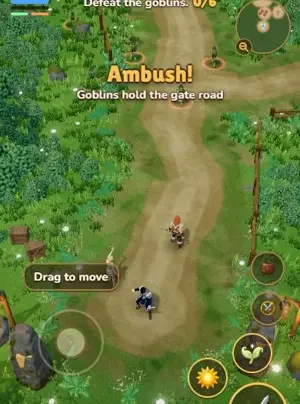
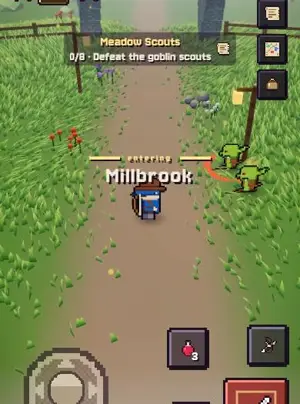
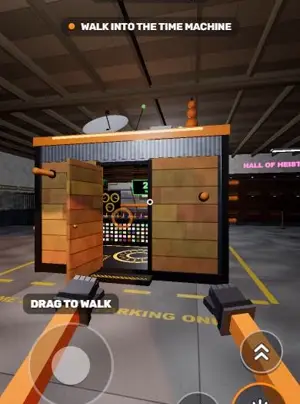
Games people made on Roam
No editor, no project: make it on your phone
Type one sentence into Roam on your iPhone, or start from a photo, and play the game with your friends.
Try: "3D platformer on floating islands, my cat is the boss, friends race me to the top"
Questions people ask
Is Rosebud AI free to make games?
Yes. The free plan gives 10,000 credits a week, and an edit with Rosie costs about 2,000. Free-plan games are non-commercial. Paid plans run from $15 to $100 a month.
Do I need to code to make a game in Rosebud AI?
No. You describe the game and Rosie writes the code. The Code tab lets you read and edit it if you want to.
Can I make a Rosebud AI game on my phone?
Rosebud publishes no phone steps, and its tutorial asks for a computer. Roam is an iPhone app that makes a game from a sentence or a photo.
Can I sell a game made with Rosebud AI?
Yes, from the 10x Dev plan ($30 a month), where commercial rights start. Free-plan games are non-commercial. Rosebud's terms say it owns content made from prompts, so read them first.
Sources, checked Nov 4, 2026
- Rosebud AI tutorial
- Rosebud AI home page
- Rosebud AI game creator
- Rosebud AI pricing
- Rosebud AI Terms of Service
- Rosebud: how to add multiplayer
- Rosebud AI: Story Games on the App Store
- Roam Terms
- Roam on the App Store
Product names belong to their owners. Roam is not affiliated with them. Facts change: check each product's own site before you choose.